
Finding a discount code is easy. Making sure it works on your order can take a little more care. A code may apply only to selected products, require a minimum spend, or be valid only in a particular country.
This guide explains how to use discount codes online, where to enter them, what to check before paying, and what to do when a code is rejected. The examples are illustrative; always check the retailer’s own terms for the offer that you plan to use.
What Is a Discount Code?
A discount code is a combination of letters, numbers, or both that a retailer lets customers enter during checkout to receive a promotion. Depending on the offer, it may reduce the price of eligible products, take a fixed amount off, or reduce delivery charges.
- Discount code: a general term for a code that reduces the cost of an eligible purchase.
- Voucher code: a common term in the UK and other European shopping contexts.
- Promo code: a promotional code used for a campaign or a specific customer group.
- Free delivery code: a code intended to reduce or remove eligible shipping charges.
These terms often overlap. The retailer’s conditions matter more than the label: check eligible products, minimum spend, country restrictions, and expiry dates.
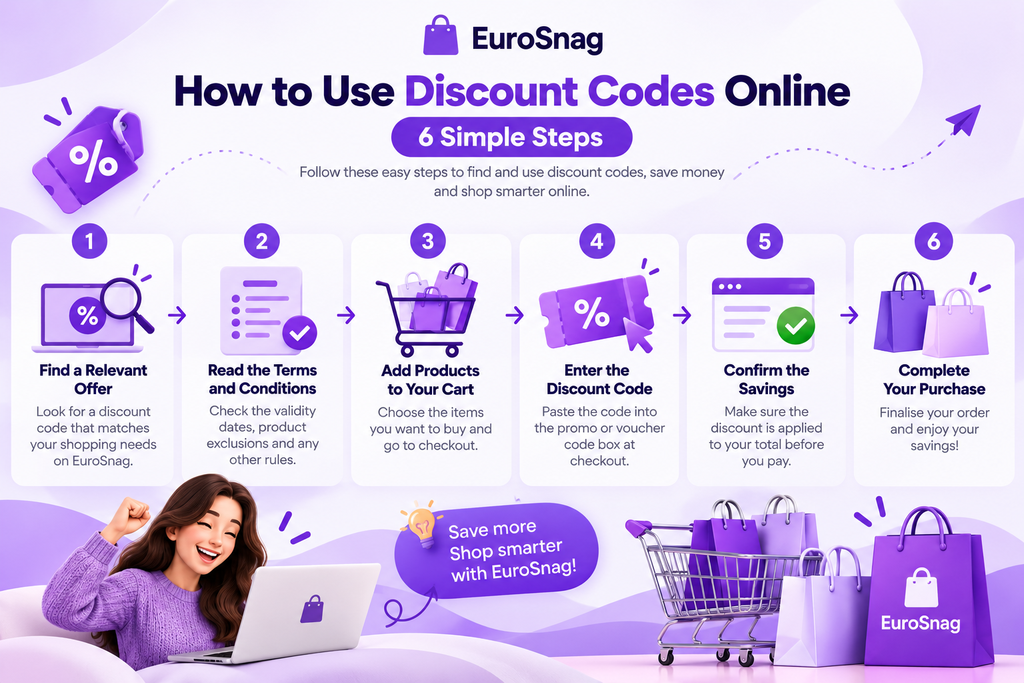
How to Use Discount Codes Online: 6 Simple Steps
Follow these steps before completing an online order. The exact checkout layout differs between shops, but the same checks will help you understand whether an offer applies.
1. Find a Relevant Offer
Start with the retailer’s official website or a coupon page that clearly identifies the shop and explains the promotion. Make sure the offer matches the product you want to buy. A clothing code, for example, may apply only to full-price items, while an electronics promotion may exclude selected brands.
Look for the expiry date, minimum spend, product exclusions, and any country or customer restrictions before relying on the offer.
2. Read the Terms Before Shopping
Check whether the order must reach a minimum value, whether sale items qualify, and whether the promotion is limited to new customers or members. Also confirm that it applies to the country version of the shop you are using and the delivery address you intend to enter.
Retailers can set different conditions for different markets. An offer shown on a German website may not have the same terms on its French or Italian store.
3. Add Eligible Products to Your Basket
Choose the items you actually want and add them to your basket. Check the price, quantity, size or colour, and delivery information. If the code has a minimum spend, check whether the retailer counts delivery or other discounts towards that threshold.
Avoid adding something you do not need just to reach a minimum spend. Compare the final totals first to see whether the extra item really saves you money.
4. Find the Promo or Voucher Code Box
Go to the basket or checkout and look for a field labelled “Promo code,” “Discount code,” “Voucher code,” “Coupon code,” or “Gift or promotional code.” It may appear below the order summary or inside a section you need to expand, especially on mobile.
Enter the code exactly as provided and select the Apply or Redeem button. If you copy and paste it, check that no extra spaces have been added at the beginning or end.
5. Confirm That the Discount Has Applied
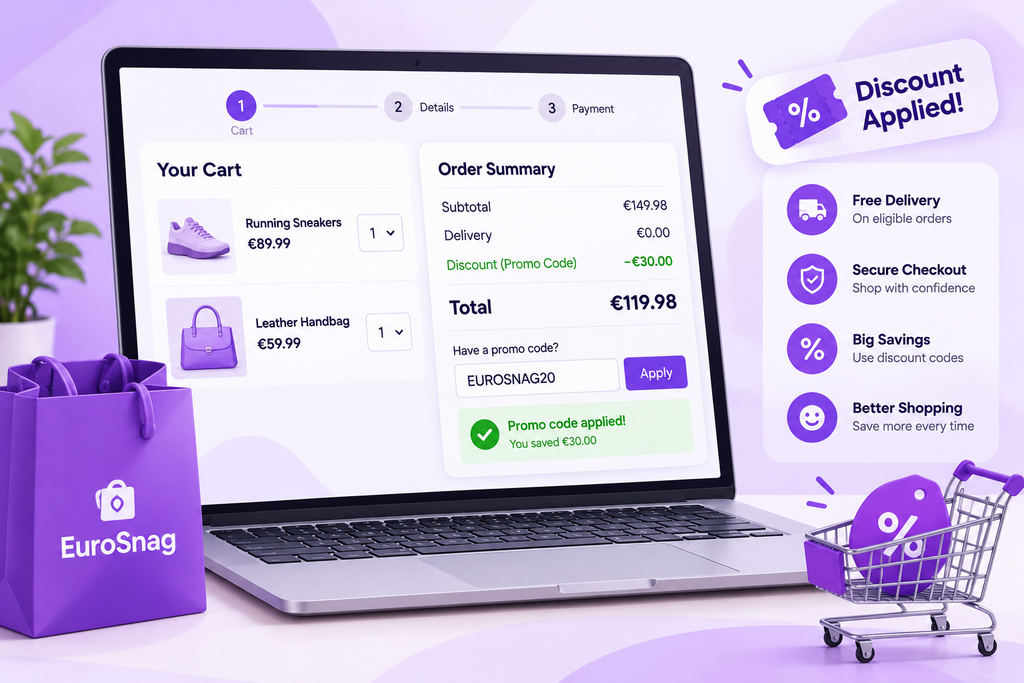
Do not assume the code worked just because you clicked Apply. Wait for the order summary to update. Check whether the discount appears as a separate line, the eligible items have changed price, or delivery has been adjusted.
For example, if eligible products total €80 and a valid offer gives 20% off those products, the discount would be €16 before any exclusions or other conditions. This is a calculation example, not a real EuroSnag coupon offer; the retailer’s checkout determines the actual saving.
6. Review the Final Total Before Paying
Review the final amount, delivery costs, taxes shown at checkout, and any other charges before confirming the order. For cross-border shopping, check the retailer’s delivery policy for your country. A promotion being available does not necessarily mean every product can be shipped to every European destination on the same terms.
When the total and order details look right, complete the purchase and keep the confirmation in case you need to contact the retailer.
Where Can You Find Discount and Voucher Codes?
The Retailer’s Official Website
Check the shop’s homepage, sale section, newsletter offer, or promotion page. Official offers can make it easier to check the precise terms and eligible products.
Retailer Emails and Member Offers
Some shops send promotions to newsletter subscribers or registered customers. These codes may be personal, limited to a particular account, or valid for a short period. Read the message carefully before using or sharing the code.
Coupon and Deal Websites
Coupon websites collect offers from different retailers in one place, helping shoppers compare promotions. On EuroSnag, check the relevant shop or offer page for the promotion details and any stated restrictions. A listed code should not be treated as guaranteed until the retailer accepts it, because offers can expire or change before third-party listings update.
Seasonal Sales and Special Campaigns
Retailers may run promotions during seasonal sales, holiday periods, product launches, or other campaigns. A sale price and a discount code do not always combine, so check the terms rather than assuming both discounts will apply.
Why Is Your Discount Code Not Working?
A rejected code does not always mean you entered it incorrectly. The offer may have expired, your basket may not meet a minimum spend, some products may be excluded, or the code may not be valid for your country or account.
Try these checks:
- Confirm that the code is typed correctly.
- Check the expiry date and offer terms.
- Verify that your products qualify.
- Review any minimum order requirement.
- Make sure you are using the correct country version of the retailer’s website.
- Check whether another promotion prevents the code from being combined.
- Refresh the basket or follow the retailer’s instructions if the checkout has not updated.
For a more detailed troubleshooting guide, read Coupon Code Not Working? 7 Common Reasons and How to Fix Them.
If the code still fails, contact the retailer’s customer support before placing the order. Share the promotion details and error message where appropriate, but never send your password or full payment-card details.
Smart Ways to Get More Value from Online Discounts
Compare the Final Price
Compare the total cost of the same product across reputable retailers, including delivery charges and any relevant return costs. A large advertised discount does not automatically make an item the cheapest option.
Check the Delivery Threshold
Some shops offer free delivery only after a qualifying spend. Work out whether reaching the threshold is worthwhile instead of adding unnecessary items to your basket.
Understand Returns and Refunds
Read the retailer’s returns policy before ordering, especially for clothing, shoes, and products where size or compatibility matters. For information about consumer rights for online purchases in the EU, consult the official Your Europe consumer shopping guidance.
Avoid Suspicious Offers
Be cautious of websites that demand payment for a supposedly free code, ask for your account password, or direct you to unexpected downloads. Use trusted sources and check the retailer’s website before sharing personal information.
Track the Actual Saving
Compare the eligible product price, the discount, delivery charges, and final total. This helps you judge the offer by its real value rather than by a headline percentage.
Frequently Asked Questions
Do discount codes work in every European country?
No. Some codes are valid only in selected countries, on a particular regional website, or for delivery addresses that meet the retailer’s conditions. Check the offer terms for your location.
Can I use more than one promo code on an order?
It depends on the retailer. Some checkout systems accept only one code, while others allow selected promotions to be combined. Check the terms and confirm the final total before paying.
Why did my discount disappear at checkout?
The offer may no longer be valid, your basket may have changed, or one or more items may not qualify. Recheck the conditions and the order summary before completing the purchase.
Are voucher codes and promo codes different?
The terms are often used interchangeably. Individual retailers may use them for different types of offers, so the promotion’s conditions are more important than its label.
Is a discount code website always up to date?
Not necessarily. Offers can expire or change, and third-party listings may not update immediately. Verify that the retailer accepts the code before relying on the saving.
What should I do if a code fails repeatedly?
Check the eligibility rules, try the retailer’s official promotion page, and contact customer support if needed. You can also follow the troubleshooting steps in our guide to common reasons coupon codes fail.
Shop Smarter, Save More: Make Every Discount Count
Using discount codes is about more than finding a lower price. The best savings come from choosing relevant offers, checking the conditions, and comparing the final cost before you buy.
Whether you shop from the UK, Germany, France, Italy, or another European market, confirm that the promotion applies to your order and delivery location. A little checking can help you avoid checkout surprises and make more confident shopping decisions.
Explore EuroSnag for more practical shopping guides and offers, and always verify the details with the retailer before completing your purchase.
Affiliate disclosure: If this page contains affiliate links, EuroSnag may earn a commission from qualifying purchases at no extra cost to the shopper. Keep this disclosure only in line with the site’s actual affiliate relationships and disclosure policy.