Coupon code not working at checkout? It can be frustrating to fill your basket, enter the code and see a message like “code invalid” or “code not applicable”. This guide walks through the common causes and the quickest checks to try first.
The good news: in most cases the code is not fake. It simply does not match something in your basket, your country or your account. Below are the seven reasons we check first, starting with the ones that take the least time to test.
Short answer: check the offer terms first, then your basket total, your delivery country and your account history. Those four cover most failed codes.
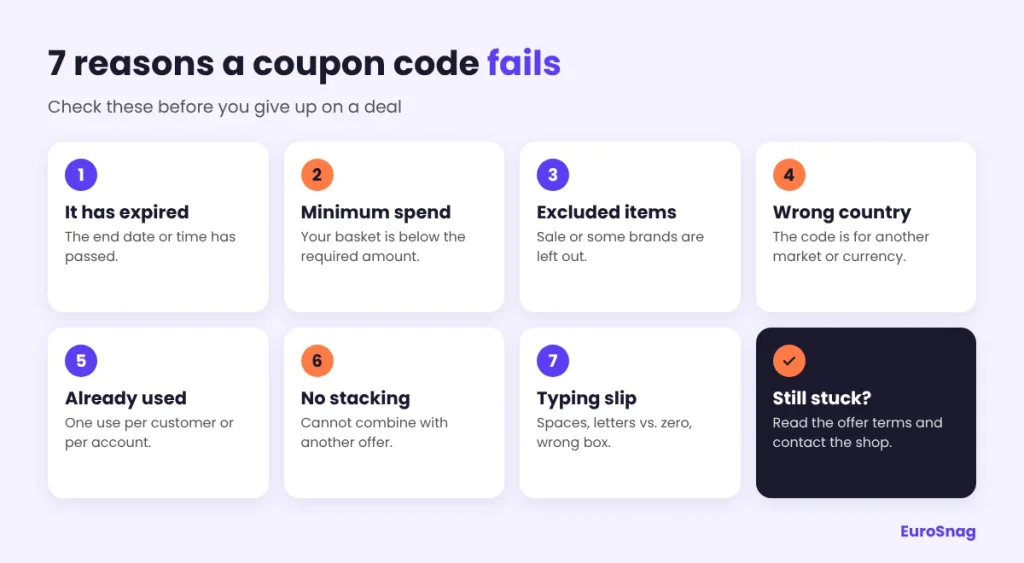
1. The code has expired
Many codes stop on a set date, and some stop at a set hour. If the shop is based in another country, its clock is not necessarily yours, so a code that ends “tonight” may already be gone for you. When a shop gives us an end date, we show it next to the offer on EuroSnag.
What to do: check the end date in the terms. If it has passed, look for a newer code from the same shop or a banner on the shop’s own site.
2. Your basket is below the minimum spend
Plenty of codes only work above a set basket value. Shops differ on what counts towards that value. Some measure it before delivery costs, some after other discounts. The terms usually say which.
What to do: compare your basket total with the minimum in the terms. If you are a little short, check whether one more item you would buy anyway still saves you money overall. Do not add things only to reach a threshold.
3. Some of your items are excluded
Codes often leave out sale items, new arrivals, certain brands, gift cards or electronics. If your basket mixes eligible and excluded items, the code may refuse the whole order or discount only part of it.
What to do: remove items one at a time and apply the code again. If it works on one product but not another, you have found the exclusion.
4. The code is meant for another country or currency
Large shops often run a separate site for each market, and a code made for one can be rejected on another. The same can happen when your delivery address is outside the countries the offer covers. If your country is not listed in the terms, the code is not meant for your order.
What to do: make sure the shop, the currency and the delivery country match what the terms say. Do not switch to another country’s site just to use a code unless the shop’s terms allow it and it delivers to you.
5. The code was already used
Welcome codes are usually for new customers and for one order per person. Shops often check your email address, your account and sometimes your delivery address. If you have ordered from that shop before, a welcome code will probably be refused.
What to do: look for phrases like “new customers only” or “one use per customer” in the terms. If they are there, look for a code aimed at existing customers instead.
6. Another discount is already applied
Many shops allow only one code per order. An automatic sale price, a loyalty reward or a newsletter code can stop a second code from working.
What to do: remove the other discount and apply your code again. Then compare the two totals and keep whichever saves you more.
7. A small typing slip
Copying a code often adds an invisible space at the end. The letter O and the number 0 look alike, and so do a capital I and the number 1. Some shops are case-sensitive. And some checkouts have two similar boxes, one for gift cards and one for promo codes.
What to do: type the code by hand and use the box labelled promo, discount or voucher code.
A 60-second check before you try another code
- Read the terms next to the code: dates, minimum spend, countries and excluded items.
- Compare your basket total and delivery country with those terms.
- Remove sale items and any other discount, then apply the code again.
- Type the code by hand instead of pasting it.
- Try a private browser window. An old session or a saved basket can sometimes block a code.

Coupon code not working? What to do next
Contact the shop’s customer support. Send a screenshot of the error message, the code and the offer terms. Support can tell you whether the code is still active for your order.
If you found the code on EuroSnag, please tell us through our contact page. We cannot change a shop’s terms, but we can update or remove an offer on our side so the next visitor does not hit the same problem.
Habits that save money and stress
- Read the terms before you fill the basket, not after.
- Compare the final total including delivery. A smaller discount with free delivery can beat a bigger one without.
- Be careful with sites that ask you to install software or pay for “guaranteed” codes. A genuine code is free to use. For general advice about shopping online in the EU, read the European Commission’s consumer rights guidance.
Some links on EuroSnag are affiliate links. If you buy through them, we may earn a commission at no extra cost to you. Read our Affiliate Disclosure for details.
FAQ
Why does my code disappear at the last step of checkout?
Some shops check the conditions again at the final step. If you change your basket, delivery option or country after applying the code, it can be removed. Apply the code last, then pay.
Can I use two codes in the same order?
Usually not. Most shops allow one code per order, and the offer terms say whether combining is allowed.
Why does a welcome code not work for me?
Welcome codes are normally limited to new customers and one order each. If you have ordered before, or used the same email address, the shop may refuse it.
Does the code work on sale items?
Often not. Many codes exclude items that are already reduced, and the terms of the offer list the exclusions.
Ready to find working offers?
Browse all stores or pick a category from the menu. If your coupon code is not working, read the offer terms before trying another one. It takes ten seconds and can save frustration.